

What are the roles in KBC Flexims?
4 types of customer-users:
- Flexims administrator: (who is also the Business Dashboard administrator)
- User: has the authority to register transactions
- Supervisor: has the authority to register transactions and submit transactions to the bank
- Read only: ‘viewing’ function, especially useful in a multi- company context
What are the authorities of a KBC Flexims administrator?
A KBC Flexims administrator can:
- Add/remove a user, supervisor, or ‘read only’ status
- Change roles (e.g. from user to supervisor)
- Add access to the product module covered by the contract
e.g. A Flexims contract for guarantees and import LCs. Person A is the supervisor for guarantees A Flexims administrator can give person A ‘user’ access to import LCs
A KBC Flexims administrator cannot:
- Add ‘user’ access to a product module that is not covered by the contract
- Change the relevant ‘multiple-eyes principle’ defined in the Flexims contract
A Flexims administrator must be aware of the relevant ‘multiple-eyes principle’.
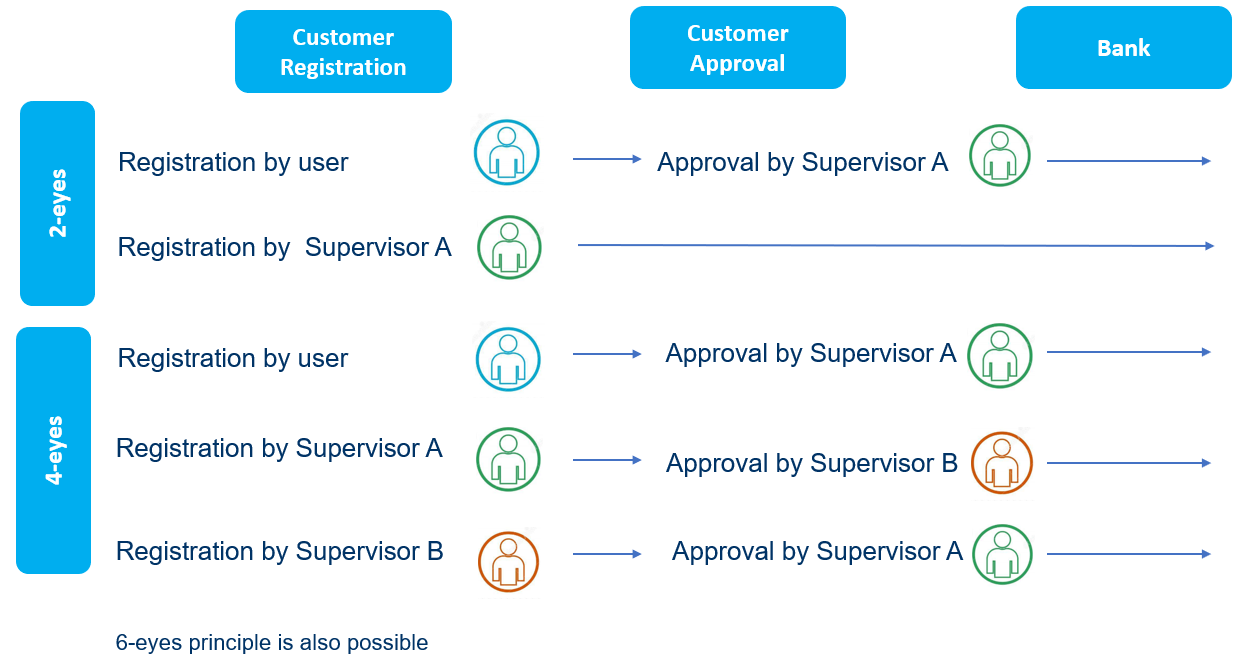
How does the ‘multiple-eyes principle’ work?
The ‘multiple-eyes principle’ is specific to each company in a commercial group
- When applying the 2-eyes principle, you need a supervisor who can submit requests to the bank
- When applying the 4-eyes principle, you need 2 users (1 of which is at least a supervisor)
A user may only register transactions, but never submit requests to the bank.
Where can additional information on using KBC Flexims be found?
How do you get started with KBC Flexims? A number of step-by-step guides are available.
Flexims has info buttons that provide specific information and general help texts (in the menu at the top right of the screen).