Manage and pay invoices the smart way from one place.
Simply link your invoicing software to KBC Mobile and experience the convenience.

Save time on your invoices
Being an entrepreneur, juggling with appointments, customers and deadlines is something you do on a daily basis. And when you do have time, you can finally deal with your incoming and outgoing invoices, a task that often requires different tools to let you track and pay them or send reminders.
If that sounds familiar, you’re probably familiar with this too:
- Manually entering payment details and hoping you don’t make a mistake
- Wasting time on paperwork that should normally only take a few minutes
- Repeatedly having to check if a customer has paid
In the end, these time-consuming tasks distract you from the real work at hand.
You want to spend less time searching, figuring out what needs to be done and double-checking things. Instead, you want clarity, certainty and one central place to process and pay your invoices with the minimum of fuss.
Well, you can now achieve all that by linking your invoicing tool or invoicing software to KBC Mobile.
Doing it enables you to work faster, reduces mistakes and gives you more control over your cash flow.
Good news for users of Cashfeed! In addition to Octopus, Yuki, SimplyBooks and Billit and Exact Online, you can now link Cashfeed, Yuki and SimplyBooks to KBC Mobile for free. Manage and pay your invoices more quickly, more conveniently and more efficiently – without leaving your familiar banking environment.
If you use another invoicing package, we have some good news for you too! It will be possible in the future to link even more packages. So, be sure to keep an eye on KBC Mobile and find out if your invoicing package is among them!
How it works – and what you stand to gain
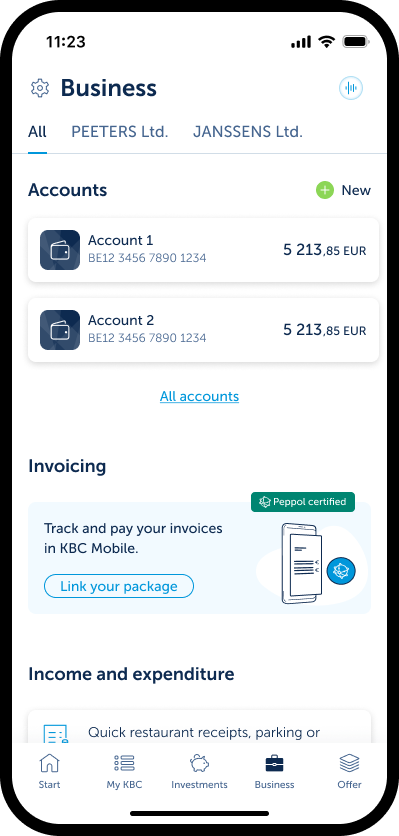
- Log in to KBC Mobile
- Tap ‘Business’ at the bottom of the screen
- Select ‘Link your package’
- Select your invoicing package
- Log in and give your consent
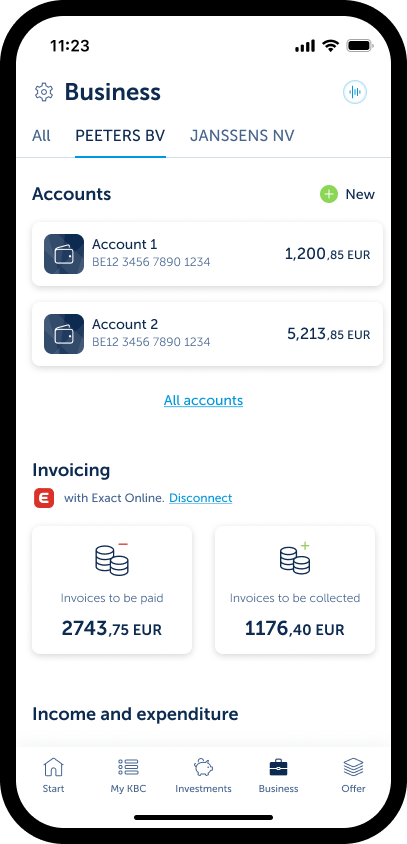
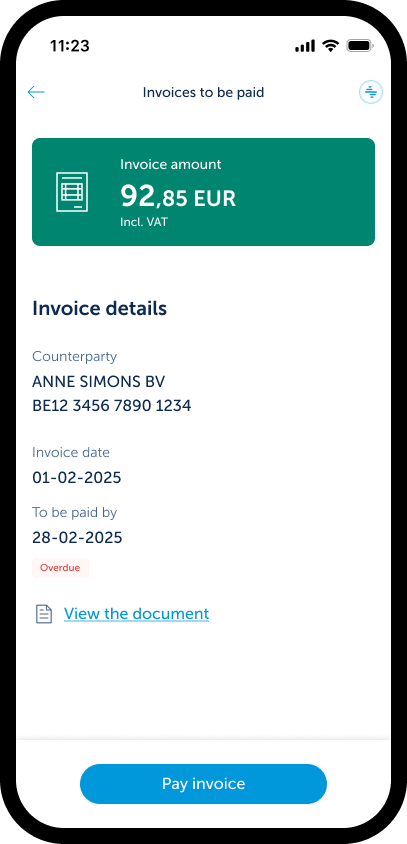
- See in real time which invoices are outstanding
- View all the details in one place
- Pay multiple invoices in a single tap
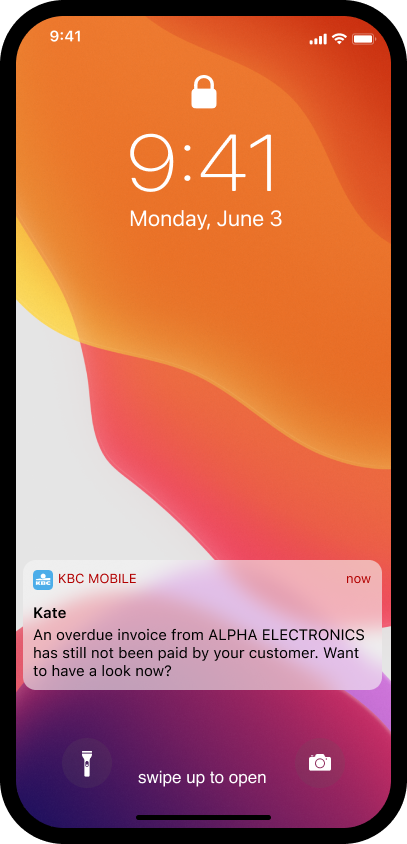
- If there are any unpaid invoices, Kate will alert you to them
- Cut out the hassle of manually re-entering or searching for payment details.
- One click is all it takes to pay and process all your invoices quickly and securely without the risk of making mistakes.
Keep track of each and every payment. Kate* notifies you when an invoice is soon due for collection.
- Log in to KBC Mobile
- Tap ‘Business’ at the bottom of the screen
- Select ‘Link your package’
- Select your invoicing package
- Log in and give your consent
- See in real time which invoices are outstanding
- View all the details in one place
- Pay multiple invoices in a single tap
- If there are any unpaid invoices, %%product.Kate%% will alert you to them
- Cut out the hassle of manually re-entering or searching for payment details.
- One click is all it takes to pay and process all your invoices quickly and securely without the risk of making mistakes.
Keep track of each and every payment. Kate* notifies you when an invoice is soon due for collection.
Linking invoicing packages in KBC Mobile
Business owners with a KBC Business Pro Current Account have access to ‘Business’, which you can now find in the main menu of the app.
* You’ll receive notifications from Kate only if you’ve enabled ‘Extra convenience’ in KBC Mobile. To do that, just ask Kate to ‘Activate ‘Extra convenience’.’
Have an Android device but not KBC Mobile?

Have an iPhone but not KBC Mobile?

Don’t have KBC Mobile?


KBC helps you run a smarter business in a wide range of areas
If you don’t have an invoicing tool yet, try Billit for a year free of charge* and enjoy the benefits of linked invoices.
* The free, one-year subscription has an actual cash value of 25 euros per month (excluding VAT). This time-limited offer is only valid for new contracts agreed via KBC. If you process more than 6 000 documents during the free year included in the offer or switch to another module, additional charges will apply. The rates for additional usage or modules can be found on Billit's website.
Frequently asked questions about Exact Online in KBC Mobile
When can I connect Exact Online to KBC Mobile?
To use the connection with Exact Online, you must meet these conditions:
- You are a legal or authorised representative
• You have access to the business section in KBC Mobile - Your company number is registered in KBC's systems
- You work with a business account (company account) from KBC
- You have already activated the CODA link or had it activated by the legal representative (this cannot be done by the agent holding power of attorney)
The exact requirements differ depending on your legal form.
Which invoices can I see in KBC Mobile?
You can see:
- unpaid invoices (incoming)
- uncollected invoices (outgoing)
Invoices do not appear until they’ve gone through the final stage of processing in Exact Online. In other words, drafts and any invoices that have not yet been confirmed (by your accountant) will not be shown.