


Digital accessibility statement
We do our best to comply with the Web Content Accessibility Guidelines (WCAG) 2.2. level AA requirements. These are international standards for digital accessibility, developed on the initiative of the World Wide Web Consortium (W3C). They are included in the European Accessibility Act (EAA), which governs accessibility of products and services and which came into force on 28 June 2025. Digital accessibility is an important element in the EAA.
There are some requirements that we have yet to meet. They are listed below, though the list is not exhaustive. Together with Diax, we are organising audits to give us a more detailed view of the issues our customers with disabilities may be struggling with. We will endeavour to solve any problems that emerge from these audits as best we can.
What is KBC already doing?

- We ensure seamless usability of KBC Mobile with our voice assistant (VoiceOver and TalkBack).
- When customers adjust the font size in their smartphone settings, it is immediately adjusted in KBC Mobile as well, for both Android devices and iPhones.
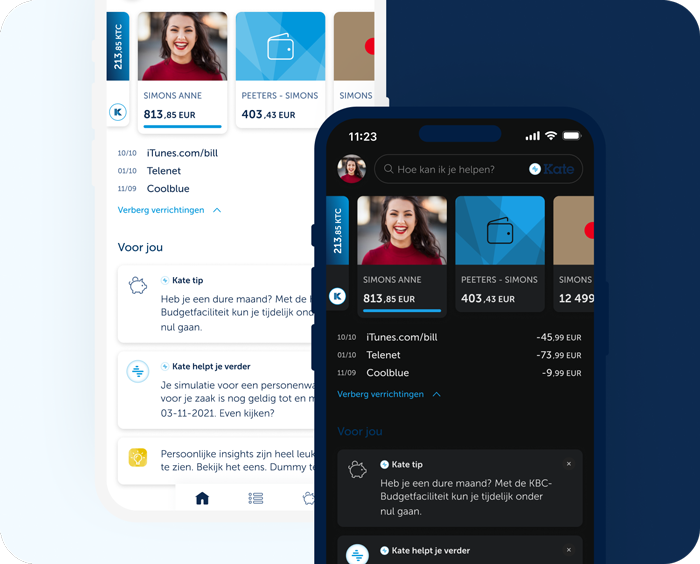
- In KBC Mobile, you can choose dark mode, a colour scheme that puts light text on a dark background.
- KBC Touch has a high-contrast feature.
- You can also use KBC Touch without a mouse and instead use only the keyboard. Among other things, this means that all links and input fields are accessible with the Tab key and can be activated with the Enter key.
We are working on the following
For our websites, KBC Mobile and KBC Touch, this still requires attention.
- Not all texts and elements (e.g. icons, images) have sufficient colour contrast.
- Sometimes we use colour as the only way to convey information.
- Not all icons or images have meaningful text.
- The logical order of titles and subtitles is not always correct.
- Some animations and videos are played automatically; a pause button is not always available.
- Not all videos have subtitles.
- If strong text magnification is used, texts may run off the screen or no longer be visible.
- Not all clickable texts are clear and easy to understand.
- KBC Mobile is not usable in landscape mode. On tablet, KBC Mobile is usable in landscape mode and in portrait mode.
- On KBC websites and in KBC Touch, the focus sequence is not always correct when using only the keyboard. By this we mean the order in which a user visits elements on our website. For example, some visitors cannot use a mouse and will use the tab key to 'browse' the website. They should be able to do this in a logical order, such as from the header to the menu, and then to the page content.
- The fields that have to be filled in on forms, and the relevant buttons and checkboxes, are not always linked to instructions or labels which explain the field that needs to be filled in.
Last updated 13 February 2026.